
Payroll Program – Employee Tax Setup
Payroll Mate 2027 — ultimate payroll preparation and check printing software — $239 only!
The employee tax setup screen lets you define the payroll tax settings for each employee inside Payroll Mate.
Employee Tax Setup Screen
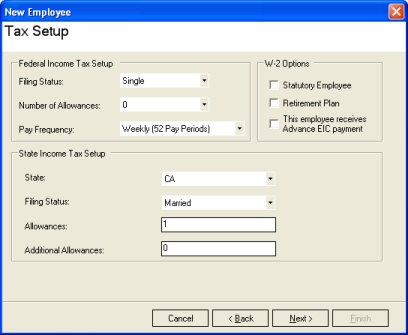
Some of the settings on this screen include:
- Federal filing status.
- Federal withholding details from the employee’s Form W-4.
- Pay frequency.
- Whether the employee participates in a retirement plan.
- State income tax setup.
About the Fields in This Screen
| 1 |
Federal filing status and Form W-4Take the federal filing status and withholding details from the employee’s signed Form W-4 so you withhold the correct federal income tax. Forms W-4 from 2020 and later no longer use withholding allowances; allowances apply only to employees who still have a Form W-4 from 2019 or earlier. |
| 2 |
State withholdingState withholding details usually come from the state’s employee withholding certificate. |
| 3 |
Pay frequencyPay frequency (payroll period) is how often wages are normally paid to the employee:
|
Payroll Mate offers everything a small to mid-size business needs to process payroll accurately and quickly, including unlimited earning, tax and deduction types, up-to-date tax tables and comprehensive payroll reports. If you are trying to figure out payroll taxes, how to do payroll or how to calculate payroll deductions, this software is for you.
Payroll Mate® Payroll Software
See everything Payroll Mate can do, or try it free today.