
Batch Update W-2C Forms for Multiple Employees
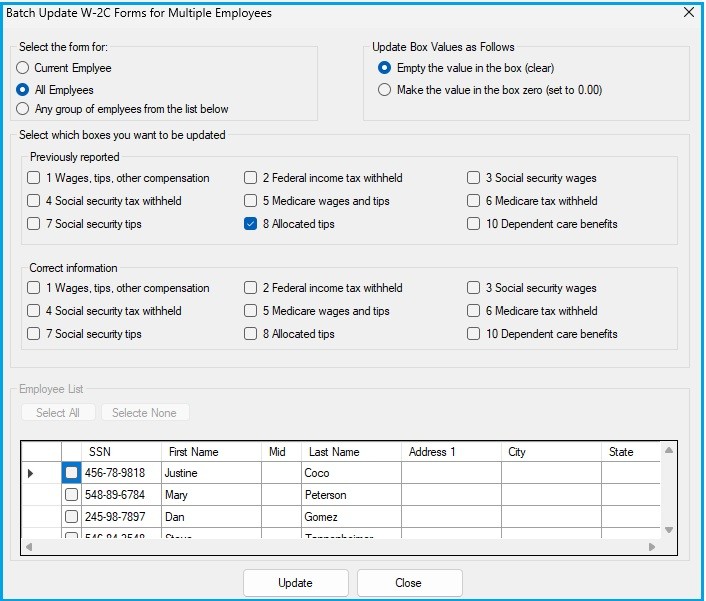
The Batch Update feature in W2Correction Mate streamlines the process of modifying multiple W-2C forms simultaneously. It enables users to clear or set values across key monetary boxes (Boxes 1–10, excluding Box 9) on the form for one employee, a selected group, or all employees within a company file. Users can apply bulk changes to either the “Previously Reported” or “Correct Information” sections of the W-2C form, saving significant time and ensuring consistency during correction cycles.
This functionality offers several benefits for accounting professionals:
- Instantly updates large groups of records without repetitive manual entry.
- Provides the option to clear a field (leaving it blank) or set it to a specific value such as 0.00.
- Targets specific boxes for correction, including Wages, tips, and other compensation (Box 1), Federal income tax withheld (Box 2), Social Security wages (Box 3), Social Security tax withheld (Box 4), Medicare wages and tips (Box 5), Medicare tax withheld (Box 6), Social Security tips (Box 7), Allocated tips (Box 8), and Dependent care benefits (Box 10).
- Allows users to apply updates selectively, maintaining full control and data accuracy.
- Is particularly useful after importing employee data from a spreadsheet or the SSA EFW2 format [(Electronic Federal Wage and Tax Exchange, a standardized IRS electronic file format for submitting wage and tax data)](pplx://action/translate), enabling batch updates and corrections across all imported records efficiently.
This feature eliminates tedious manual edits and reduces the risk of input errors across multiple W-2C forms, greatly enhancing the correction workflow for employers and tax professionals alike.
Step-by-Step Instructions
- Open W2Correction Mate and either create a new company or open an existing one.
- Click on the W-2C Forms Tab and then click Add W-2C Form.
- Enter employee details.
- Click on Tools, then click Other Tools, and then click Batch Update W-2C Forms for Multiple Employees.
- Make a selection under Select the Form For.
- Make a selection under Update Box Values as Follows.
- Select which boxes you want to be updated Update Box Values as Follows.
- In the "Previously reported" section, you can select one or more for Box 1-10.
- In the "Correct information" section, you can select one or more for Box 1-10.
- Depending what you chose in "Select the Form For" you might need to select employees from the Employee List Select one or more employees.
- Click Update.
Back to W2Correction Mate Tutorials Home
Disclaimer: All tutorials provided are for informational purposes only. Please consult the IRS, your state department of revenue, or a tax professional for official advice and guidance regarding tax matters, including W2 corrections and W-2C filing.