
How to Correct the Tax Year on a Form W-2
If a W-2 was filed with the wrong tax year, the original filing must be voided and a new one with the correct tax year must be created. This requires filing two separate W-2c forms: one to zero out the incorrect filing and another to submit the correct information for the right year.
Step-by-Step Instructions
- Open W2Correction Mate and either create a new company or open an existing one. NOTE: Start with the wrong tax year in the company information, as the original filing must be voided. The purchase of W2Correction Mate for each tax year is required, and each year must be enabled to switch years.
- Click on the W-2C Forms Tab and then click Add W-2C Form to create the first of the two separate W-2c forms.
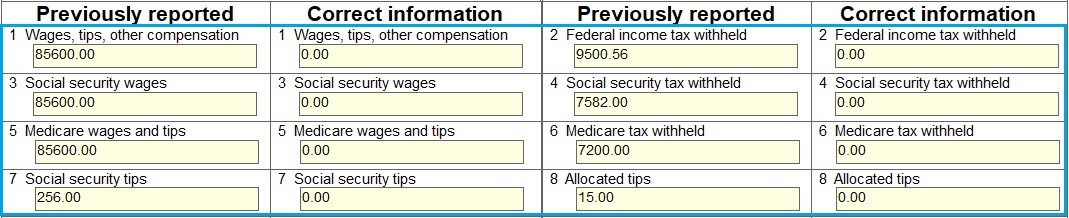
- First W-2c (to Void):
- Verify that "Tax Year/Form corrected" (c) is the incorrect tax year that you need to Void.
- Enter the employee details.
- In the "Previously reported" column, enter all information from the incorrect W-2.
- In the "Correct information" column, enter zero for all monetary amounts to void the original form.
- Click Save
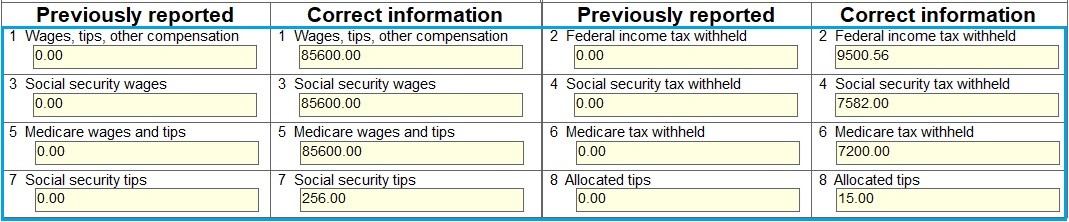
- Second W-2c (to Correct):
- Click Company > Edit Company Info, click the Tax Year dropdown, select the correct tax year.
- Click Save
- Click on the W-2C Forms Tab, select the employee, click Edit W-2C Form.
- Verify that the "Tax Year/Form corrected" (c) is the correct tax year that you need to Correct.
- In the "Previously reported" column, enter zero for all monetary amounts (to cancel the voided form).
- In the "Correct information" column, enter all of the correct wage and tax information.
- Click Update
- To print the employee's copy, select the W-2C Form tab and click Print. In the dialog, select "Copy B—To Be Filed With Employee’s FEDERAL Tax Return".
- To print the SSA copy, select the W-2C Form tab and click Print. In the dialog, select "Copy A—For Social Security Administration".
- To e-file, select the Summary W-3C Form tab, and click E-File W-2C / W-3C Forms. Fill out information in the dialog, and click the Click here to review the W-3C form button. Click the I have reviewed the W-3C form box. Click OK. Once you create the e-File, you need to upload to the SSA BSO website.
- Give the employee the corrected W-2c that shows the proper tax year.
Back to W2Correction Mate Tutorials Home
Disclaimer: All tutorials provided are for informational purposes only. Please consult the IRS, your state department of revenue, or a tax professional for official advice and guidance regarding tax matters, including W2 corrections and W-2C filing.