
Resolving a Duplicate W-2 Filing
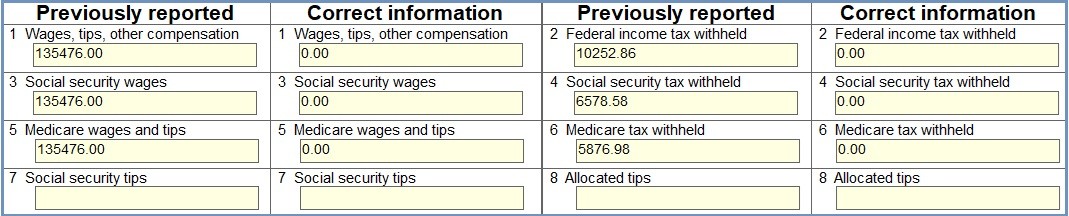
Accidental duplicate W-2 filings can cause confusion for both the employee and the IRS. To resolve this, a W-2c must be filed to void the duplicate form. The corrected form will report zero for all wages and tax amounts, effectively canceling out the original incorrect filing.
Step-by-Step Instructions
- Open W2Correction Mate and either create a new company or open an existing one.
- Click on the W-2C Forms Tab and then click Add W-2C Form.
- Enter employee details.
- In the "Previously reported" columns, enter all information from the duplicate W-2 you wish to void.
- In the "Correct information" columns, enter zero in all monetary fields.
- Click Save.
- To print the employee's copy, select the W-2C Forms tab, select the employee from the list, click Print. In the dialog, select "Copy B—To Be Filed With Employee’s FEDERAL Tax Return".
- To print the SSA copy, select the W-2C Form tab, select the employee from the list, click Print. In the dialog, select "Copy A—For Social Security Administration".
- To e-file, select the Summary W-3C Form tab, and click E-File W-2C / W-3C Forms. Fill out information in the dialog, and click the Click here to review the W-3C form button. Click the I have reviewed the W-3C form box. Click OK. Once you create the e-File, you need to upload to the SSA BSO website.
- Distribute a copy of the corrected W-2c showing the voided information.
Back to W2Correction Mate Tutorials Home
Disclaimer: All tutorials provided are for informational purposes only. Please consult the IRS, your state department of revenue, or a tax professional for official advice and guidance regarding tax matters, including W2 corrections and W-2C filing.