Virginia 1099-NEC E-File Details
- Web Upload is a free and secure file-based system to electronically file 1099-NEC statements to the Virginia Department of Taxation (Department).
- It is highly recommended to name the 1099 files as "1099NEC REPORT".
- You will receive a confirmation email once Web Upload processes the file you submitted.
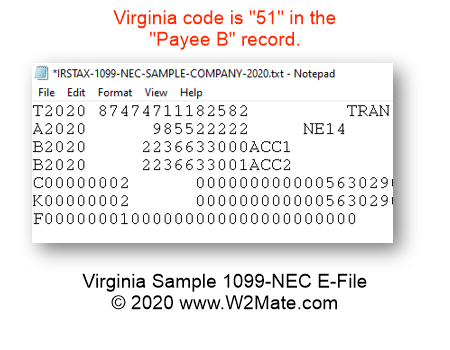
- For 1099-NEC text files each record is 750 characters.
- The carriage return and the line-feed characters must be placed in positions 751 and 752, respectively.
- 1099-NEC records submitted through Web Upload must follow the IRS’s Publication 1220 file formatting.
- State tax ID formatting: 30-123456789F-001 [first 2 digits must be 30. Middle number is Federal identification number and the letter F. Last 3 digits must be 001 to 009.].
- Before E-Filing with Virginia, you need to enter data inside our software. 1099-NEC records can be typed manually or imported from Excel spreadsheet, QuickBooks, Sage 50, Dynamics GP and other accounting sources.
In addition to Virginia, we also offer 1099-NEC e-File for the following states: Arizona, Arkansas, Delaware, District of Columbia, Georgia, Indiana, Iowa, Kansas, Kentucky, Maryland, Massachusetts, Mississippi, Missouri, Nebraska, New Jersey, North Carolina, Oklahoma, Oregon, Vermont, West Virginia, and Wisconsin.